
It shows a student what their GI Bill® benefits actually become before they pick a school.
The method has a name: the phase approach. You map the education benefits your family holds, then use them in the order that gets the most from each: the Post-9/11 GI Bill® (Chapter 33), Chapter 35 DEA, the Fry Scholarship, and the Yellow Ribbon Program, phase by phase across a degree. College Tool runs that method for you.
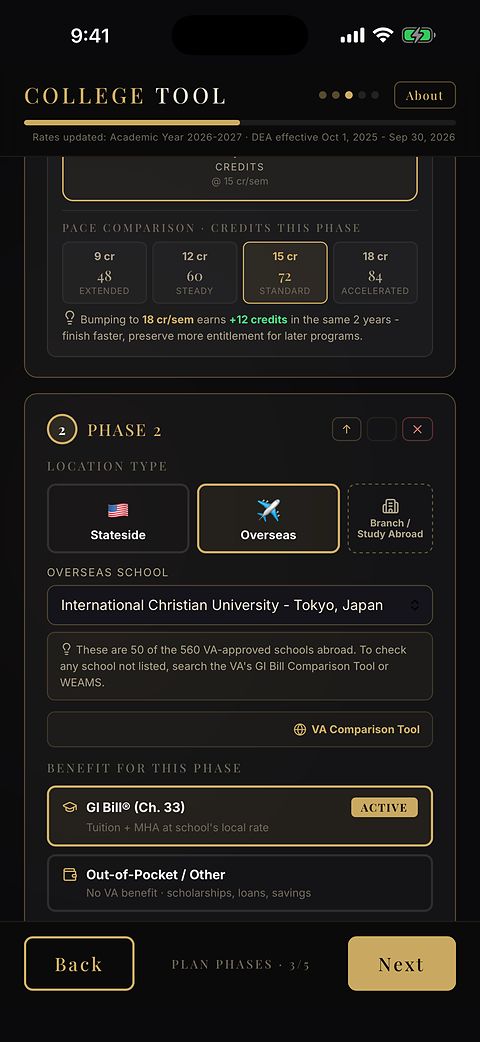
If you have earned or qualify for more than one VA education benefit, the order changes the total your family ends up with, often by thousands of dollars. The app shows you how.
The math runs off the school’s zip code, which is how the VA sets the Basic Allowance for Housing for that location. It uses currently published rates, and it speaks plain English instead of VA jargon.
The benefit rules underneath that math are the same ones School Certifying Officials are trained to apply. RA completed the School Certifying Official (SCO) training in 2026.
It handles three location patterns
On a U.S. campus
The math runs off that campus’s zip code.
Studying overseas
Foreign school, a U.S. university’s overseas branch, or a study-abroad term: it switches to the VA’s foreign-school flat rate.
Part here, part abroad
It switches term by term, based on where you’re physically sitting in class. That’s been the rule since 2018. The app follows it.
Then it stacks everything else
On top of that sequence it stacks anything else you’ve earned or qualify for: transferred months from a parent’s GI Bill, scholarships, dependent aid, and tuition assistance.
- Don’t have one? Leave it blank. The plan still runs.
- When you’re done, it prints your plan, your inputs organized into estimates with its official references, for your records and review. VA decides eligibility and benefits, so confirm the plan with VA and your School Certifying Official.
Cost-of-living estimator
A cost-of-living estimator sits on top of the benefit math. It starts from general placeholder numbers for the location you choose. You amend the variables (food, transportation, utilities, plus the fixed expenses you already know) until the picture reflects your actual situation. Leave anything blank that doesn’t apply; the estimate works with whatever you give it.
The output is a working estimate. It is not a budget, and not financial advice. The placeholder numbers are general starting points and may not reflect current local costs, so adjust them to your own situation. It exists so you can stop guessing in your head about whether the math works for your family, and start adjusting real numbers on a real screen.
Planning to move a benefit to a spouse or child? See how GI Bill transfer benefits fit the phase approach. Want the free tier or the full planning experience? See pricing. New here? Start with the GI Bill app overview.
University Veterans offices, JROTC instructors and School Certifying Officials have written back to say The Order Matters was useful, and public libraries in Florida and Texas carry it. See who.